Valerie's INI eyecandy
- by Vaelux
- 11 upvotes
- Downloaded 2,355 times
Description

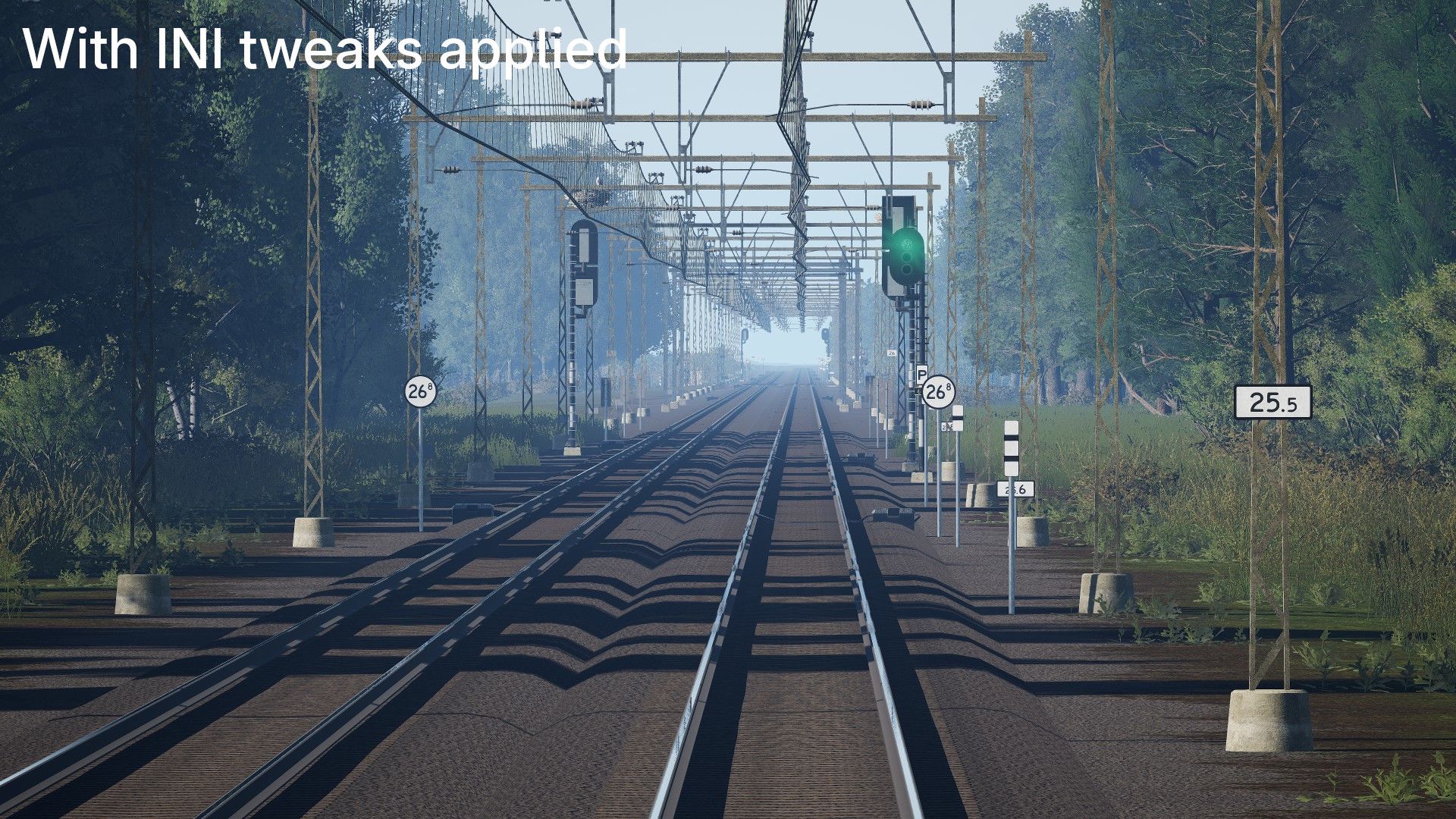

Info
This is a selection of INI tweaks I have made to make my game look better while keeping similar performance as I already had.
They are also intended to be daily drive-able tweaks rather than being made for taking pictures only.
I use an RX 7900 XTX for 1920x1080 (with the Ultra preset). These tweaks might not work super well for everyone but are worth trying and playing around with!
Lower presets are now included for people who do not have high-end graphics cards/setups.
I have included comments for each change I made, these should mostly explain what was changed and the most performance heavy things have info on what to change for more performance
Included changes
A non-comprehensive list of the included changes:
- Lens flares (medium intensity)
- Higher LOD quality & distances
- Higher shadow quality & distances
- Higher quality/more stable reflections
- Better foliage LODs and pop-in distance
- Fog changes
- Forced FXAA anti-aliasing (TAA looks rather bad whenever moving imo)
- Disabled motion-blur
- Aggressive texture sharpening & VRAM allocation tweaks (Meant for high-end GPUs)
Update logs
Version 2025.10.06
Added different presets for lower tier GPUs
- "Ultra" remains the same as the original
- "High" is a reasonable reduction from ultra sacrificing some visuals for performance but keeping high render distances
- "Medium" tries to balance looks with performance, reduced render distance and visuals compared to "High"
- "Medium Low" also tries to balance looks with performance with a slightly lower render distance and reduced maximum shadow quality (Tested and working with 50+fps on a mobile RTX 3060 6GB)
- "Low" still improves view distances and some other visuals over default but only moderately. Meant for lower VRAM (6GB or below)/lower performing cards only.
- "Very Low" only slightly improves render distance over default, meant for really low-end cards. Test higher presets before trying this one!
All presets still include the lens flares and a few other tweaks that should barely impact performance.
Notes
I used maxed game settings (under advanced > everything as high as possible) and then applied these tweaks (using the Ultra preset). I am using DX12 using the launch argument -DX12
I have tested this on a selection of routes including "Zwolle - Groningen", "LGV Mediterranee" & a few others (to check different ToD versions) in multiple weather conditions including: sunny, cloudy, raining, storm, snowy
Made for TSW6 but should (mostly) work for 5 and older too.
(Using the Ultra preset) At 200% render scale on 1080p (effectively 4k) I get around 60 FPS on modern routes.
If you notice any issues or have suggestions, feel free to leave them in the comments!
Preview images are taken using the Ultra preset.
Info about my exact setup (in case of performance questions/issues)
My setup:
- CPU: Intel I7 11700K
- RAM: 48GB DDR4 @3200mt/s
- GPU: RX 7900 XTX 24GB
- STORAGE: NVME SSD @gen 4 speeds
- OS: Arch Linux (using Proton experimental provided by steam)
- Game platform: Steam
- Game arguments: -DX12
Tags: graphics ini signal-visuals tweaks visuals
Dependencies


Not required - recommended if you want to do performance testing in different weather conditions and such without having to reload over and over

Installation Instructions
Copy the text from the .txt file into your engine.ini (put below existing contents) found at C:/users/[username]/Documents/My Games/TrainSimWorld6/Saved/Config/WindowsNoEditor/ (default on Windows) or /home/[username]/.local/share/Steam/steamapps/compatdata/3656800/pfx/drive_c/users/steamuser/Documents/My Games/TrainSimWorld6/Saved/Config/WindowsNoEditor/ (default on Linux, if installed on another drive, change the home/[username]/.local/share/Steam to where your library is located).
Make sure to write-protect this file after editing it (on Windows: right-click > properties > check read-only, on Linux using dolphin: right-click > properties > permissions > owner > "can only view")
Files
Version 2025.10.06 - Originally made for TSW 6
Ultra remains the same as the original
Version 2025.10.06 - Originally made for TSW 6
High is a reasonable reduction from ultra sacrificing some visuals for performance but keeping high render distances
Version 2025.10.06 - Originally made for TSW 6
Medium tries to balance looks with performance, reduced render distance and visuals compared to the High preset
Version 2025.10.06 - Originally made for TSW 6
Medium Low tries to balance looks with performance with a slightly lower render distance and reduced maximum shadow quality
After the game was set to the medium preset with 100% render scale, this version was applied and tested. This version is working with 50+fps on a mobile RTX 3060 6GB at 1440p.
Version 2025.10.06 - Originally made for TSW 6
Low still improves view distances and some other visuals over default but only moderately. Meant for lower VRAM (6GB or below)/lower performing cards only.
Version 2025.10.06 - Originally made for TSW 6
Very Low only slightly improves render distance over default, meant for really low-end cards. Test higher presets before trying this one!
Comments
About this mod

- Created
- 2 Oct 2025
- Updated
- 6 Oct 2025
- Game
- Train Sim World
- Type of content
- Other
- Train Sim World Version
- Train Sim World 5, Train Sim World 6
Loading comments…