Announcements Maintalbahn Aschaffenburg Miltenberg by Tokio
- by Tokio
- 4 upvotes
- Downloaded 595 times
Description
Update: 23 / 02 / 2024
Here is the fictional announcement package for the Maintalbahn, created by Tokio.
Services:
RB 88: Aschaffenburg - Miltenberg
RB88: Miltenberg - Aschaffenburg
RE 87: Aschaffenburg - Miltenberg
RE87: Miltenberg - Aschaffenburg
and my new Special Announcements
My other created announcements will be updated to this quality in the future, and new announcements will be made in the future.
The voices now have a natural quality, and the texts have been updated to ensure a uniform and recognizable announcement for future announcement packages.
**All Announcements are in german and english language. **
The announcements are now (and in the future) always arranged as follows:
An announcement when leaving the station (a short greeting).
An announcement before the next station (with informations! These announcements can be up to 2 minutes long at large stations, so play them in good time).
The announcements work best with the external program Soundpad.
It is available on Steam (full version is needed, which I can really highly recommend).
Soundpad is easy to use and offers a clear interface.
Installation and how to use my announecments:
With Soundpad, the announcements are very easy to insert, and they are activated with hotkeys in the background.
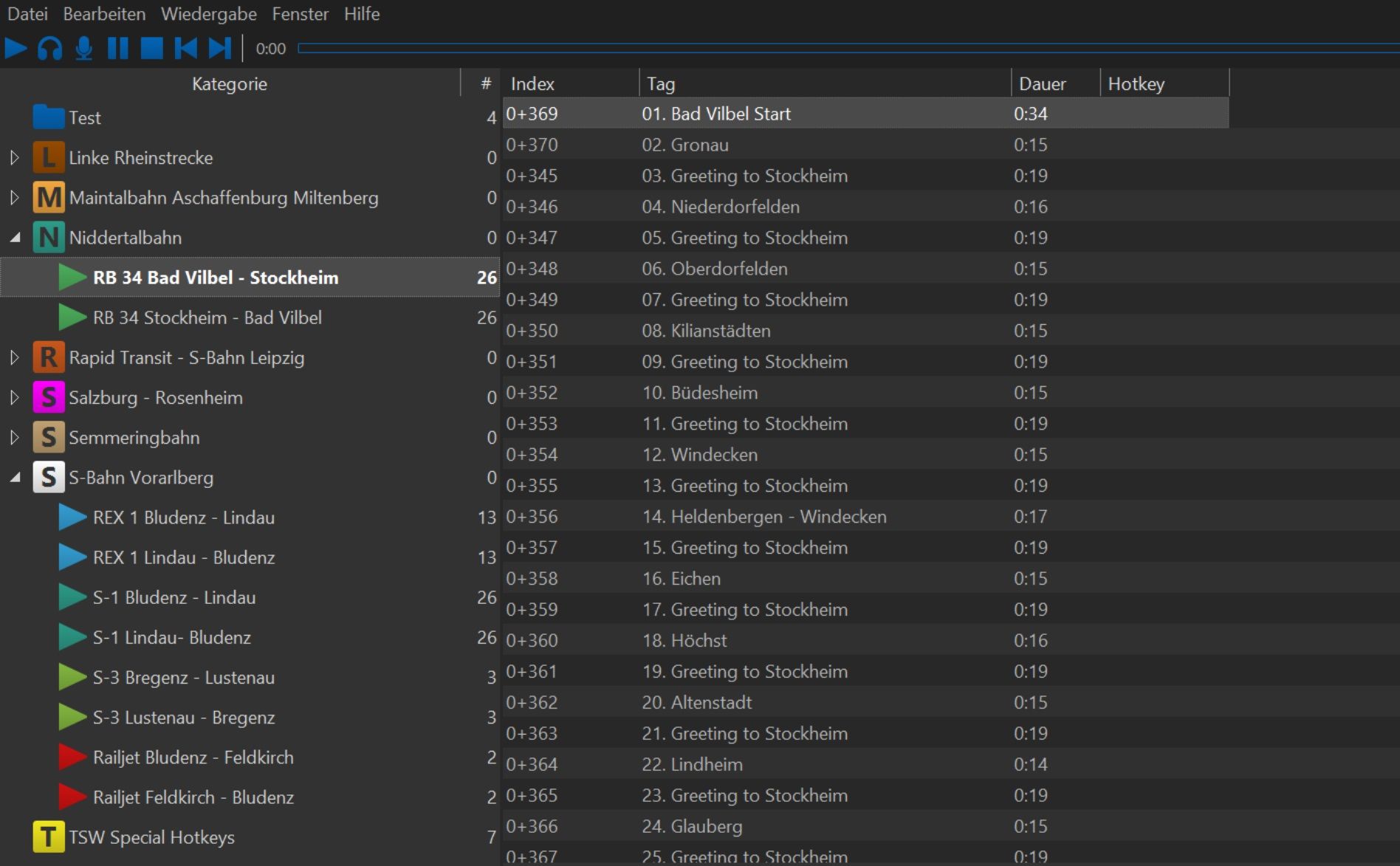
You create a category (a service) in Soundpad in the left column. E.g. "Niddertalbahn". In this service, you insert subcategories for each service.
Simply copy the sound files from the ZIP download into the respective service. The announcements are ordered according to the correct sequence for playing.
In this image, you can see how I did it.
In Soundpad settings, select a hotkey for "play next file," e.g., Num-8.
Now you can easily play the sounds one after another with your hotkey.
SPECIAL:
New are the special announcements in the "special" folder. The use of this is optional but adds significantly more depth to the announcements!
These include information on which direction the doors open and announcements for special events, e.g., a red signal, delay, or similar.
To be able to use these sounds sensibly, I strongly recommend a 2nd monitor (or a tablet. I use my iPad as a 2nd monitor via the free app Spacedesk, which also allows touch inputs).
For these sounds, you can assign hotkeys (note: "same hotkey in all categories" must be disabled in the settings).
If you use the special announcements, e.g., Num-1 for "exit left" announcement and Num-3 for "exit right" announcement, then the hotkey for "normal announcements" for the route no longer works because Soundpad automatically switches to another category (unfortunately).
Therefore, you now simply activate the route announcements via the 2nd monitor (with the mouse, click on the next file) or with the iPad (touch), which gives the whole thing an even better feeling.
Now I wish you a lot of fun with my announcements. If you have any questions or suggestions, feel free to write them in the comments. :)
Disclaimer:
The idea of using soundpad for the announcements was not my idea.
I'm not claiming anything here. Manny inspired me.
I created the files myself, invented the text and edited the audio.
Anyone who wants to use the announcements is welcome.
Tags: announcements maintalbahn sound
Dependencies

Play sounds in voice chats in high digital quality. Add sounds or music to your microphone signal so others will hear it, too.

Return to the portside town of Aschaffenburg, Germany and embark on Regionalbahn services along the Main Valley. No wires, no fuss, your next adventure awaits aboard the sleek DB BR 642 DMU, wind your way to Miltenberg in Train Sim World 4: Maintalbahn!
Additional Comments
Credits to Mulumbu / Idea Soundpad
Files
Comments
About this mod

- Created
- 18 Feb 2024
- Updated
- 23 Feb 2024
- Game
- Train Sim World
- Type of content
- Announcement
- Train Sim World Content
- Maintalbahn: Aschaffenburg - Miltenberg
- Train Sim World Version
- Train Sim World 4


Loading comments…