TSW Companion HUD

Description

English

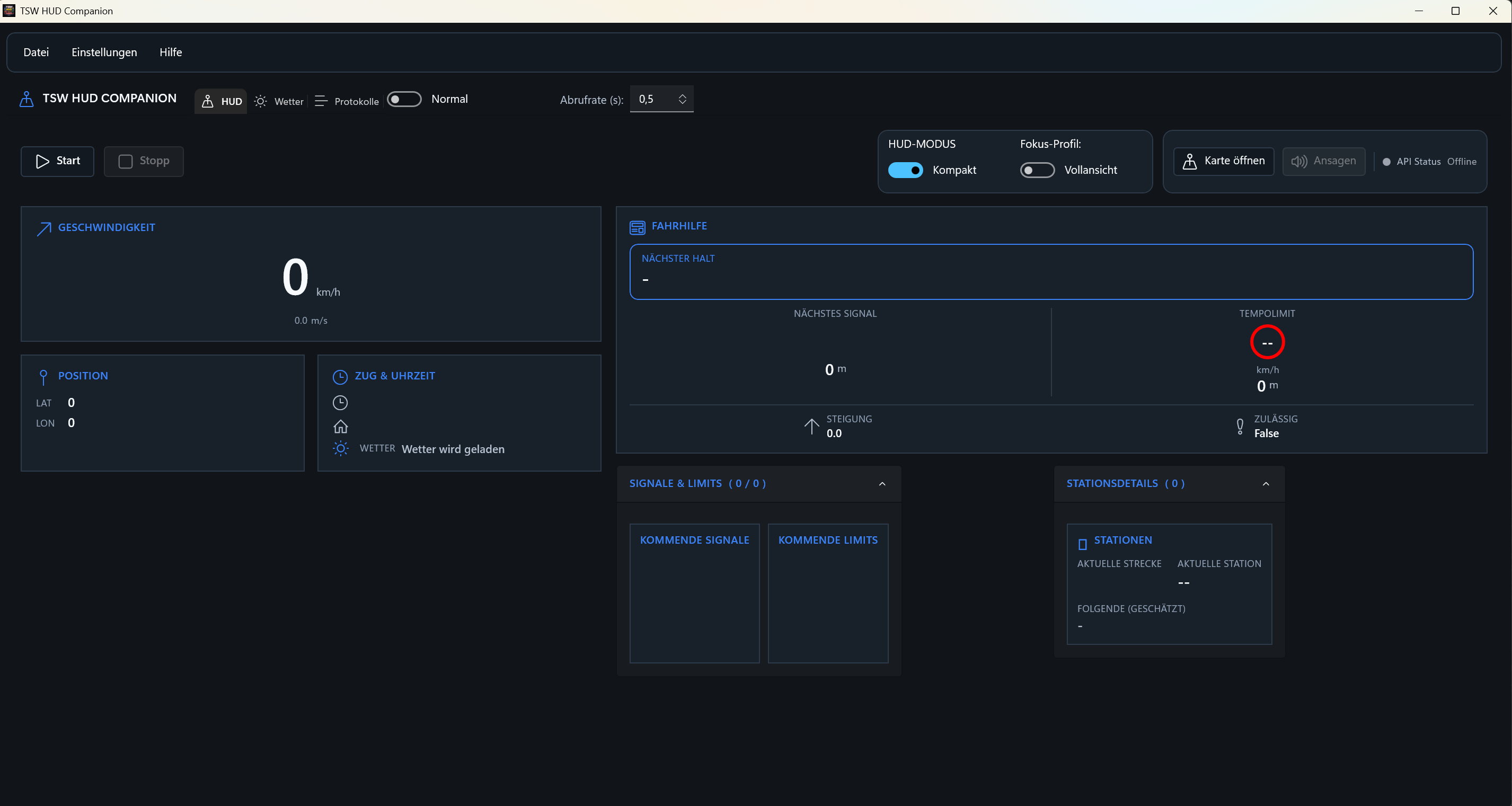
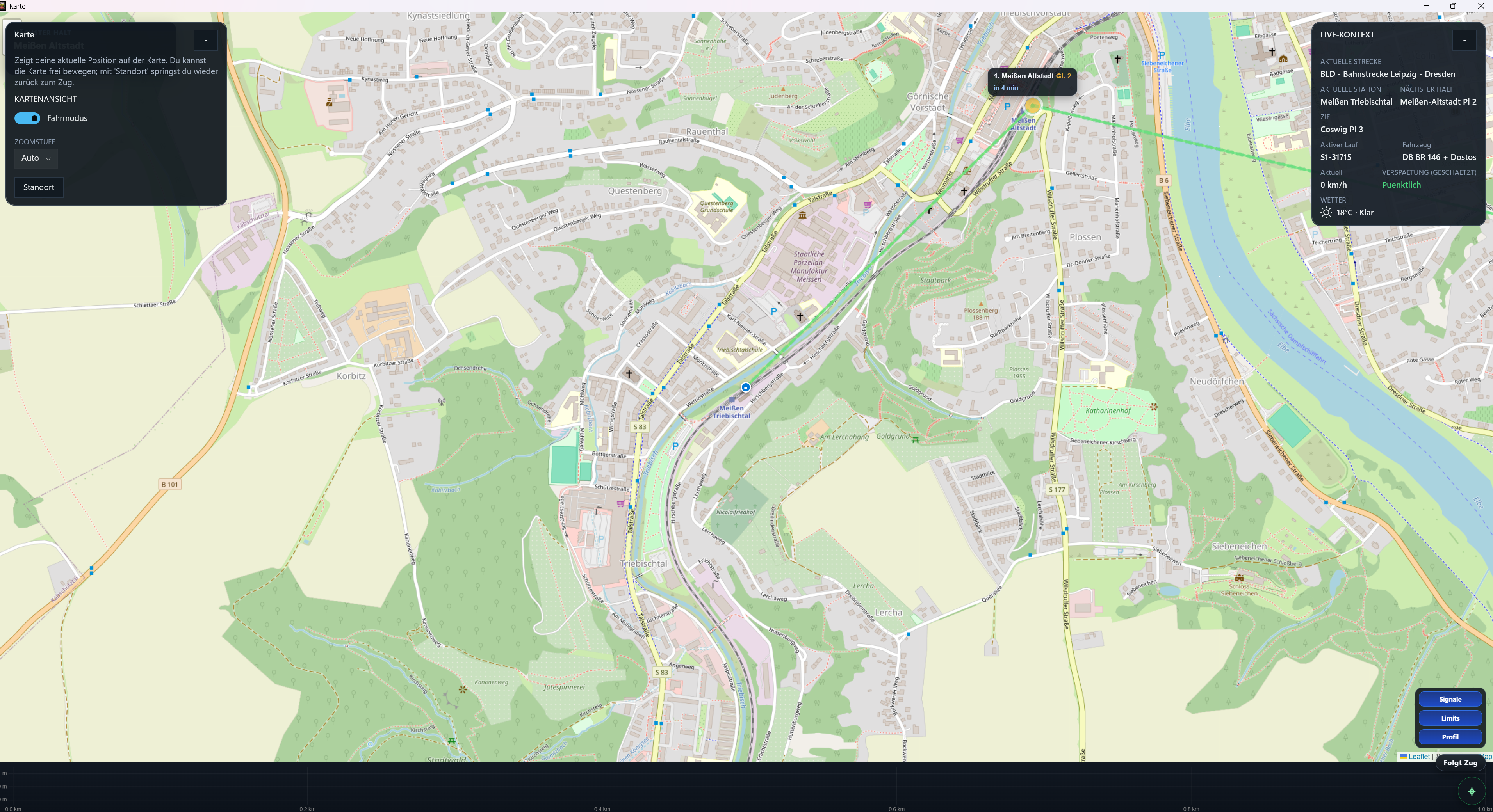
TSW HUD Companion is an external live HUD and diagnostics tool for Train Sim World 6.

It connects to the local Comm API, enriches live game data with local route/service/station context, and gives you a clearer operational view than the default HUD alone.

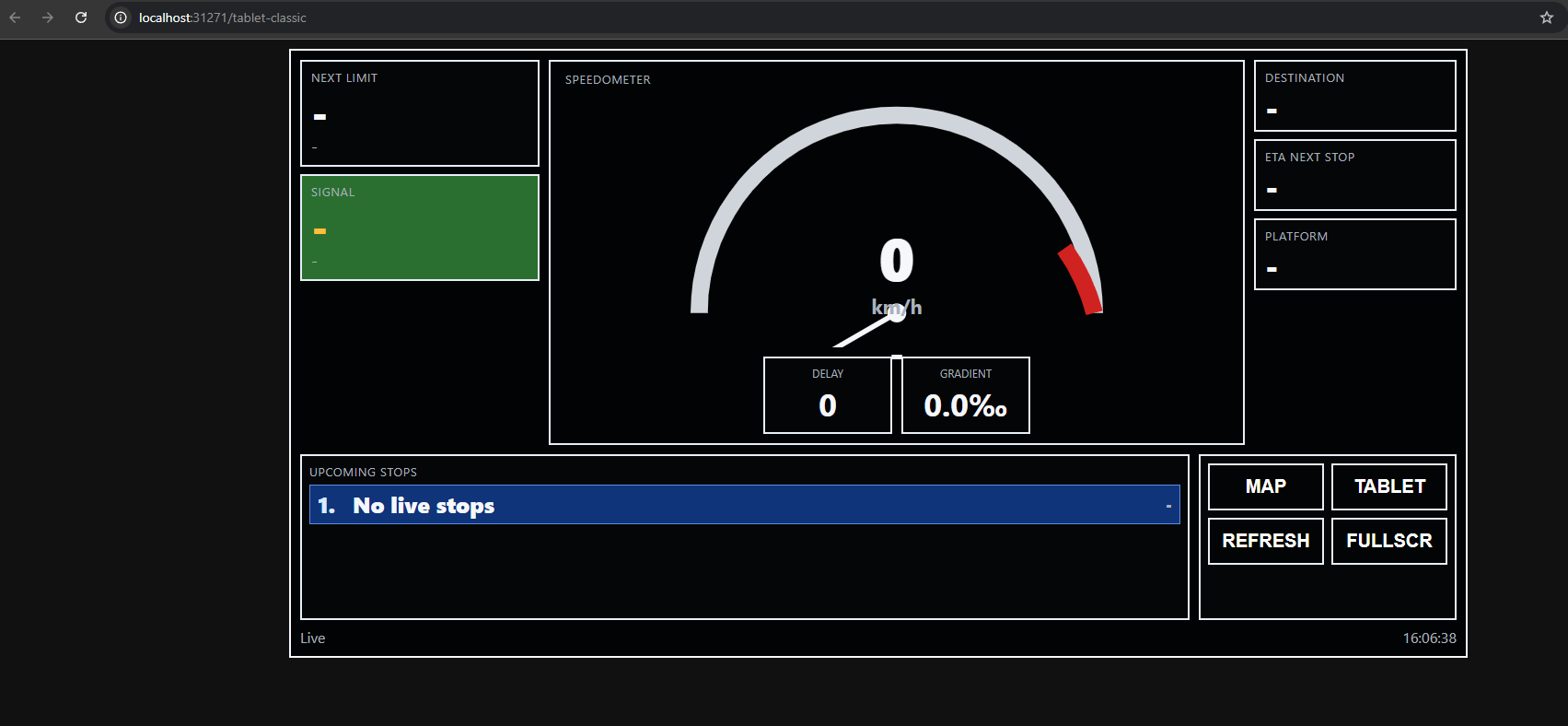
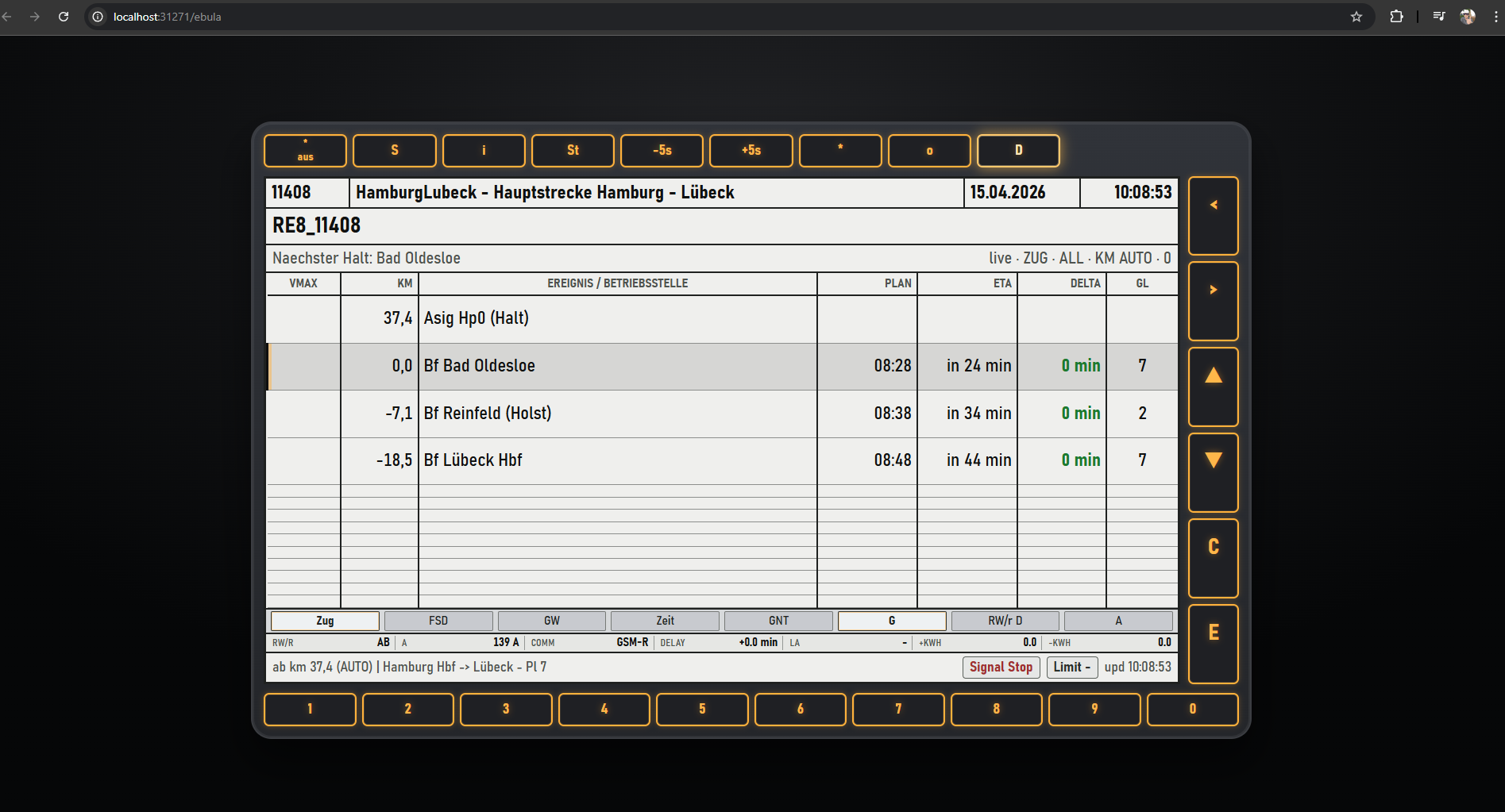
Out of the box, the app includes a live HUD plus direct second-screen tools for Map, Tablet HUD, and EBuLa, along with station context, weather controls, announcement visibility, replay/testing tools, and in-app update handling.

This release (v0.5.0) focuses on practical day-to-day operation: less noise, better replay handling, and a simpler install/update story.

New in 0.5.0 (Major Highlights)

  • Replay and recording are easier to control:
    • choose your own recording folder/path
    • keep live replay timeline separate from optional disk recording
    • inspect replay timeline/events without forcing full recording workflow
  • Log view is now calmer during driving:
    • filter by Info / Warning / Error
    • optional replay-noise toggle
  • Update workflow is now a primary path:
    • built-in auto-updater flow
    • patch path and full-install path
    • rollback support
    • dedicated installer build

Core Features

  • Live HUD for speed, route context, service/scenario context, signal/limit preview, and station details
  • Dedicated second-screen tools: Map, Tablet HUD, and EBuLa quick-open actions
  • Live map/tablet endpoints for desktop, tablet, or phone usage in the same session
  • Timetable and scenario-aware route context
  • Station details with platform context, route quality hints, and upcoming-stop diagnostics
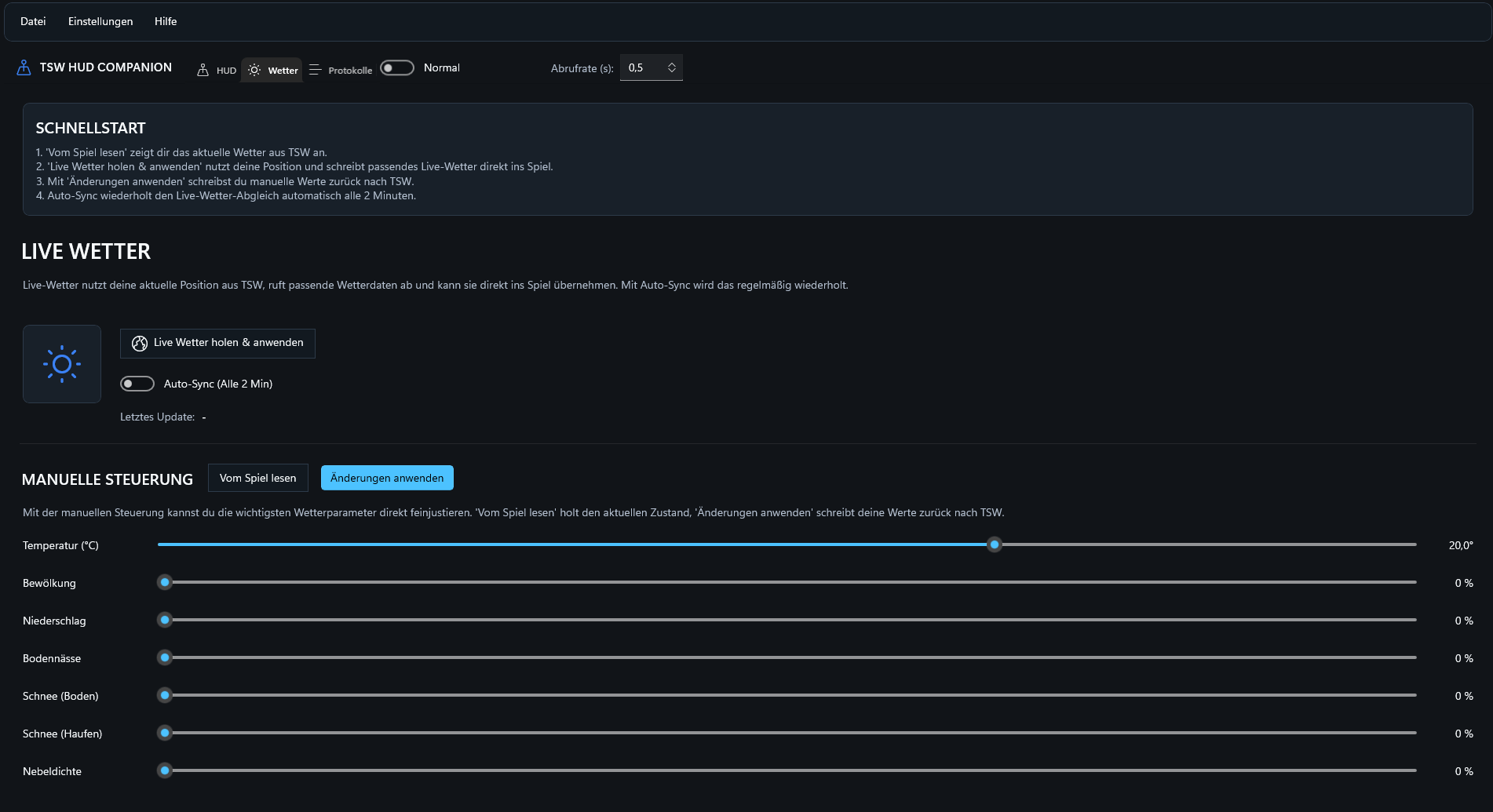
  • Weather panel with read/apply flow for live in-session weather adjustments
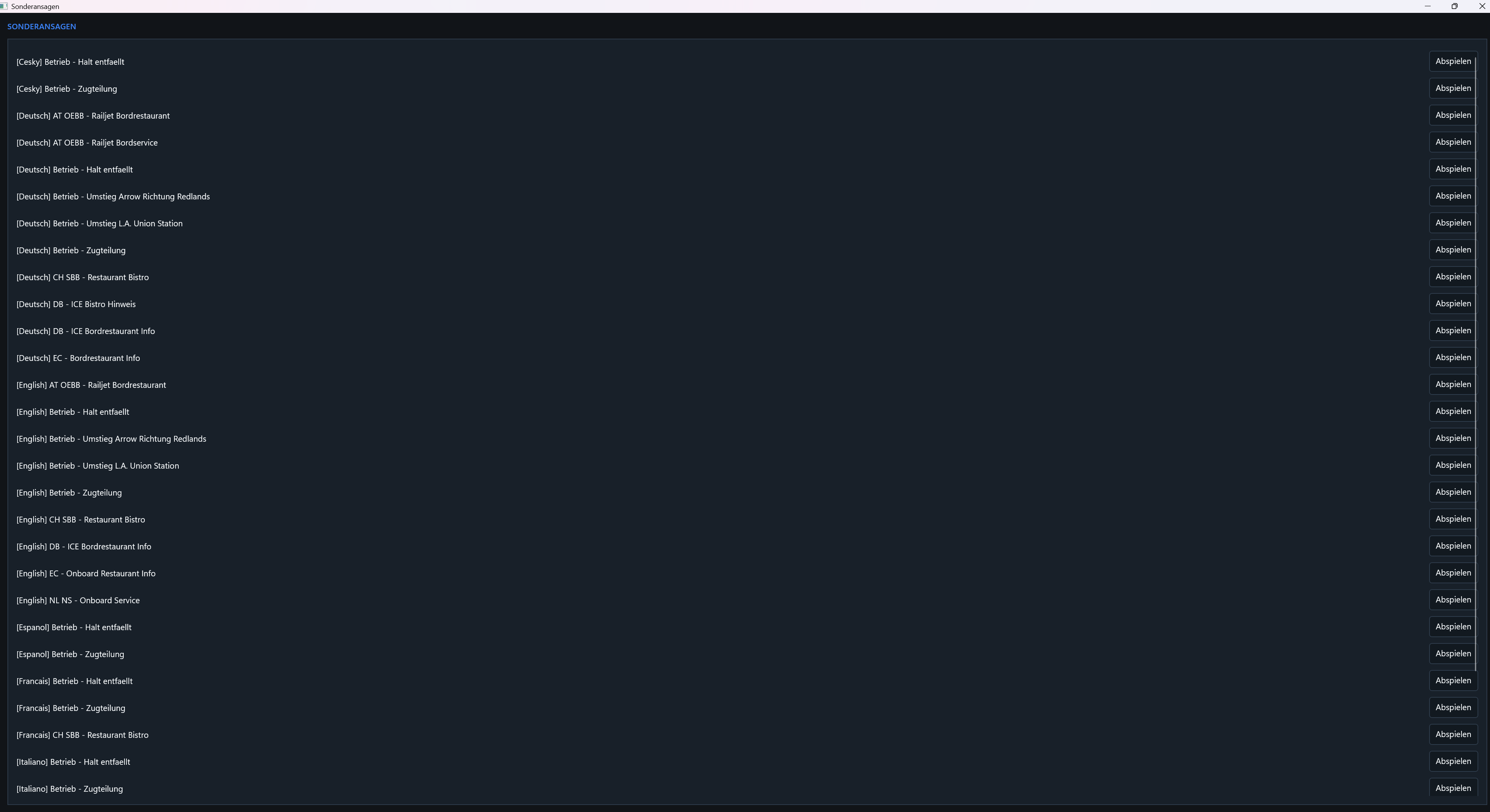
  • Announcement panel integration (Ansagen) for operating context and special-call visibility
  • Replay/test-run mode for non-live testing
  • Session recording for post-run diagnostics
  • Integrated updater with in-app check and installation flow

TSW HUD Companion ist ein externes Live-HUD- und Diagnose-Tool fuer Train Sim World 6.

Die App verbindet sich mit der lokalen Comm API, reichert Live-Spielinformationen mit lokalem Strecken-/Dienst-/Stationskontext an und liefert im Betrieb einen deutlich klareren Ueberblick als das Standard-HUD allein.

Direkt enthalten sind ein Live-HUD sowie die Second-Screen-Tools Karte, Tablet HUD und EBuLa, dazu Stationskontext, Wettersteuerung, Ansage-Sichtbarkeit, Replay-/Testfunktionen und integriertes In-App-Updatehandling.

Diese Version (v0.5.0) fokussiert sich auf den Alltag: weniger Rauschen, besseres Replay-Handling und ein einfacherer Install-/Update-Weg.

Neu in 0.5.0 (Grosse Highlights)

  • Replay und Recording sind einfacher steuerbar:
    • eigener Recording-Ordner/Pfad waehlbar
    • Live-Replay-Timeline sauber getrennt vom optionalen Disk-Recording
    • Replay-Ereignisse pruefen ohne zwangsweise Voll-Recording-Workflow
  • Log-Ansicht fuer den Fahrbetrieb beruhigt:
    • Filter fuer Info / Warnung / Fehler
    • optionaler Replay-Noise-Schalter
  • Update-Workflow als Hauptweg ausgebaut:
    • integrierter Auto-Updater
    • Patch-Pfad und Vollinstallations-Pfad
    • Rollback-Unterstuetzung
    • dedizierter Installer-Build

Kernfunktionen

  • Live-HUD fuer Geschwindigkeit, Streckenkontext, Dienst-/Szenariokontext, Signal-/Limit-Vorschau und Stationsdetails
  • Dedizierte Second-Screen-Tools: Karte, Tablet HUD und EBuLa direkt aus dem HUD oeffnen
  • Live-Karte/Tablet-Endpunkte fuer Desktop, Tablet und Handy in derselben Session
  • Fahrplan- und szenariobewusster Streckenkontext
  • Stationsdetails mit Bahnsteigkontext, Route-Quality-Hinweisen und Haltediagnose
  • Wetterbereich mit Lesen/Anwenden-Flow fuer Live-Anpassungen waehrend der Fahrt
  • Ansage-Integration (Ansagen) fuer Betriebskontext und Sonderansagen-Sichtbarkeit
  • Replay/Test-Runner fuer Tests ohne Live-Session
  • Session-Recording fuer Nachanalyse
  • Integrierter Updater mit In-App-Pruefung und Installations-Flow

Tags: companion hud map scenarios timetable tsw6 weather

Installation Instructions

Installation and Updates

  1. Download and run the installer: TSW_HUD_Companion_Setup_0.5.0.exe
  2. Start Train Sim World 6
  3. Start TSW HUD Companion and press Start in the HUD tab
  4. Future updates can be handled directly from inside the app:
    • automatic check on startup
    • manual check via Help -> Updates -> Check for Updates

Installation und Updates

Installer herunterladen und starten: TSW_HUD_Companion_Setup_0.5.0.exe
2. Train Sim World 6 starten
3. TSW HUD Companion starten und im HUD-Reiter auf Start klicken
4. Kuenftige Updates direkt in der App abwickeln:

  • automatische Pruefung beim Start
  • manuelle Pruefung ueber Hilfe -> Updates -> Nach Updates suchen

Additional Comments

Notes

  • The app can run without optional third-party credentials.
  • Some diagnostics and live-data enrichments depend on route/provider availability.
  • Replay/testing features are optional and can be switched off.

Hinweise

  • Die App funktioniert ohne optionale Drittanbieter-Zugangsdaten.
  • Manche Diagnose-/Live-Daten-Erweiterungen haengen von Strecke/Provider ab.
  • Replay/Test-Funktionen sind optional und koennen deaktiviert werden.

Files

Comments

Avatar of Train Sim Society
Train Sim Society 19 Mar 2026

Great app! No option to change between MPH and KM/H though.. :(
Also would love to see smooth transitions between the weather updates if that's possible. :)

Avatar of el_capitano
el_capitano 19 Mar 2026

I take a look for the next version :)

Avatar of frankie
frankie 19 Mar 2026

Nicely done! The live map tracking makes a lot of fun already.

Avatar of Hyperlord1337
Hyperlord1337 20 Mar 2026

Very cool already! I played with the BR145 Expert in Dresden-Leipzig and my service was never recognized and switched between S-Bahn, RB and some British Electro Star ;-)
Click weather auto-polling and the game crashed.

The map feature is insane good already, gekommen um zu bleiben

Avatar of el_capitano
el_capitano 20 Mar 2026

Yeah the new Update should fix some things :) Take a look and dont hesitate to contact me. Screenshots would help alot

Avatar of Hyperlord1337
Hyperlord1337 22 Mar 2026

I'm willing to help, no issues.

Avatar of joakim
joakim 20 Mar 2026

Thank you sir its works very good TIMES LATE WORKS IN SCENARIO PLANNER GREAT WORK MOD

Avatar of HelloandMore
HelloandMore 20 Mar 2026

Excellent work! May I ask for the github repo link?

Avatar of Centi
Centi 24 Mar 2026


this is so weird, do you have any idea on where i can find said API key?

Avatar of Ivy
Ivy 24 Mar 2026

C:\Users\Alvan\Documents\My Games\TrainSimWorld6\Saved\Config\CommAPIKey.txt

Avatar of Ivy
Ivy 24 Mar 2026

https://ribeaniebaby.x02.me/i/JQGE.png
being able to hide these bits on the map and select different map layers such as terrain or nightmode would be cool

Avatar of el_capitano
el_capitano 25 Mar 2026

i'll check for this

Avatar of Takimata
Takimata 4 Apr 2026

Great app, but could add the ability to change the background color or use a brighter one? If you use Windows Light Mode, the app is very hard to read - black letters on a dark background.

Avatar of joakim
joakim 6 Apr 2026

i dont understand last tool Announcements where i use this someone know?

Avatar of Bernd
Bernd 6 Apr 2026

Hello, you've really created a fantastic tool here, respect! I do have a question, though: is it intentional that the next-but-one stop is always displayed instead of the next one? It's a bit confusing. Best regards, Bernd

Avatar of Takimata
Takimata 6 Apr 2026

nice update (0.3.2) , but at light mode You can`t read the Speed Limit

!

Avatar of kw_rob
kw_rob 16 Apr 2026

Moin, leider habe ich ein nerfiges Probleme. Ich denke aber eher, dass ich etwas Falsch mache.

Aber zuerst: Mega Tool, gerade für mich als Anfänger hilft es unfassbar gut. Danke dir.

Ich kriege auf DB Strecken immer nur CS Delay ansagen. Nix Deutsch ;-) Ich habe in den Einstellungen auch schon auf Deutsch gewechselt - bringt nichts. Zudem springt gerade die ganze Zeit zwischen 9 Minuten verspätung und Pünktlich hin und her. Dadurch werde ich mit Delay Meldungen zugeschüttet. Hier könnte man vielleicht einen Timer einbauen, wie lange er warten muss, bis er ein Update aussprechen darf. ;)

Ausserdem habe ich noch die Frage, ob ich diesen Warn beheben kann. Das Spiel liegt bei mir ganz wo anders wie es im Standart ist.
Ich habe bisher keine Option gefunden, in der ich den Path vom DLC Ordner anpassen kann.
[WARN] No DLC data folder found (data/dlc).

Dann noch Ideen/Anmerkungen Sachen zu den Ansprachen.

  • Ab und zu Gibt er den nächsten Bahnhof an, ab und zu nicht. Ich kann nicht ganz Ausmachen, woran das liegt
  • Die Option einen Gong vor einer Ansprache zu schalten fände ich persönlich Mega
  • Eventuell noch die Option: Die Türen öffnen sich in Fahrtrichtung ...

All in All ein mega cooles Tool. Alleine die Spielerrei mit der DB API - Finde ich einfach super geil.

Danke für deine Mühe, ich freue mich, was noch so kommt.

Avatar of Thrasher37
Thrasher37 17 Apr 2026

so in 0.4 it worked ok, was a bit janky, like you spawn in a scenario and HUD and Map would tell you your on a different scenario but 90% still on same route. now in 0.5 neither HUD or Map match anything what so ever for me, il do a service and it will show on the Map im suppose to be in a differernt country or on another route entirely (most of the time it alwasy says im on the SEHS) as i only play UK routes, but even the HUD is massively delayed along with the Map, the Player icon updates like every 30s-1minute, the HUD is completley off in speed, next stations, again doesnt read the Right TT, Sceranrio, Train/Loco.

i just want to clarify that when we use it you,
1.Start game (load into main menu)
2.Open the HUD App
3. Press start in HUD App
4. Open Map in HUD App
5. Pick the route (TT/Scenario)

or am i doing something wrong here?

Avatar of Hyperlord1337
Hyperlord1337 18 Apr 2026

I second this, I rolled back to 4.0 since the map was so nice working back then and no anouncments playing ;-)

Avatar of mergesroka
mergesroka 18 Apr 2026

Its a very great mod, but there is one problem. When i tried using LAN mode, its just didnt work, and nothing opened. Can someone help?

Avatar of trainsimulatordriver

It is unable to find my DLC folder and I cannot find a way to set it manually. In settings I see [WARN] No DLC data folder found (data/dlc).
I suspect it may be confused because I have all versions of TSW installed. I looked in the folder and I cannot see a configuration file that has a path in it.

Avatar of smokeswitch
smokeswitch 19 Apr 2026

When I open the (external) Dashboard mode via a web browser, it says 'Disconnected', while the Tablet modes work normally. Any ideas?

Avatar of HuskerDingo
HuskerDingo 24 days ago

Is there a dark mode for the HUD App? I cant find the option :(

Add a comment

If you wish to leave a comment, please log in .

About this mod

Created
18 Mar 2026
Updated
15 Apr 2026
Game
Train Sim World
Type of content
Utility
Train Sim World Version
Train Sim World 6