Program Synopsis
The 2D skies in Train Simulator Classic are only accurate for four days a year (one in each season) and for one location in the UK. This program allows them to be accurate for every day of the year, no matter where the route/scenario is in the world. You can drive with the correct sun/moon trajectories, sun/moon rise/set times, lighting, sky colours and adhesion based on the scenario date and location, whilst using the skies from the Armstrong Powerhouse Sky & Weather Enhancement Pack 2.0. Due to its complex nature, it is essential that you read the manual before attempting to use this program.
Please note that because Quick Drive scenarios do not show up in the scenario list like Career, Standard and Free Roam scenarios do, they are NOT SUPPORTED by this program. They are made by the simulator when you click to load into them, so it's not possible to select them beforehand.
Detailed Description
Train Simulator Classic has two systems for the sky/weather: a 2D Time of Day (TOD) system, and a 3D dynamic system using SilverLining.
The 2D system is from the original Train Simulator Classic release and comes with several limitations. Firstly, the lighting, sun/moon trajectories, and sunrise/set and moonrise/set times are all set on a per-season basis for one specific latitude, meaning any scenario set as summer will have the exact same sun/moon trajectories and timings. This particularly becomes an issue for scenarios set in winter months, where the sun should set between 4pm and 5pm (in the UK), but the season chosen in the scenario is spring to prevent there being snow on the ground, which gives a sunset time of 5:45pm. On the contrary, the 2D system is visually far more flexible and customisable, which is why Armstrong Powerhouse use it for their Sky & Weather Enhancement Pack 2.0.
The 3D system was introduced in Train Simulator 2015 under the Dynamic Clouds option. It improves upon the 2D system by dynamically setting the sun/moon trajectories and timings based on the scenario date and location, as well as having actual 3D clouds which move and cast shadows, compared to a static texture for the 2D system. However, it has less customisation and has other limitations, such as clouds not rendering in the distance.
This program gives you the best of both systems by combining the superior visuals and choice of sky/weather from the 2D system with the dynamic nature of the 3D system. This provides the most realistic sky/weather representation in Train Simulator Classic. Using the Sky & Weather Enhancement Pack 2.0 from Armstrong Powerhouse as a base (required for this program to function), it allows you to select which scenario you want to drive before you load it and updates the sun/moon trajectories and times to match the scenario date and location, just like the 3D system does by default. It will also set the lighting, sky colours and adhesion (on Armstrong Powerhouse rolling stock add-ons) to match the scenario date, rather than it being based on the season that is chosen in the scenario editor. For example, if you have a scenario with a date in January (northern hemisphere), but the season is set to spring so that there is no snow on the ground, the program will use lighting, sky colours and adhesion that is applicable to winter, rather than spring, to make it even more realistic.
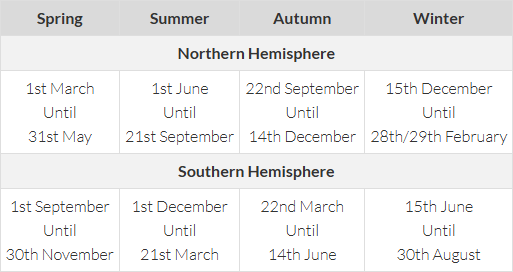
The table below shows which lighting, sky colours and adhesion will be used, based on the scenario date.
There are a number of factors which could cause a specific route or scenario to generate an error message when using the program. Whilst the program has been thoroughly tested on multiple systems, it is impossible for us to test every route and scenario combination, so if you encounter any issues whilst using the program, please fill out the Google Form here, providing as much detail as possible.
Tags: accurate ap armstrong-powerhouse enhancement sky swep time-of-day tod weather
The program is installed to “RailWorks\plugins\AP Sky Accurate Time of Day” and is called “AP Sky Accurate Time of Day.exe”. The program will start automatically when Train Simulator Classic is launched (this can be disabled, details in the manual), and a shortcut is included in the Start menu for ease of access.
This program has been released with the permission of Armstrong Powerhouse, however they do not endorse it and are not liable for any issues that you may have as a result of using it. We (On Track Simulation) cannot be held responsible for any damage that this program causes to your installation, nor is it in any way affiliated with Armstrong Powerhouse and must be considered as a wholly third-party creation. It is essential to read the manual before attempting to use this program.
v1.0.0 – Initial release.
v1.1.0 – Various fixes and improvements based on user feedback, including:
v1.2.0 – Various fixes and improvements based on user feedback, including:
v1.2.1 – Various fixes and improvements based on user feedback, including:
v1.2.2 – Various fixes and improvements based on user feedback, including:
v1.2.3 – Various fixes and improvements based on user feedback, including:
v1.2.4 – Compatibility with the Sky & Weather Enhancement Pack 2.0 April 2026 update
I'm writing a second comment, I checked the program's operation. Now I can believe that it's autumn in the 1D66 scenario from HST (MTU), and at 19:00 it's already completely dark. Thanks again, I've been missing this for a long time!
Funnily enough I think that was one of the scenarios I tested an early version of this on a couple of months ago! It's amazing how many scenarios we drive in daylight when realistically it should be dark. On the other hand though, if you're driving a summer scenario in Scotland without this program, it gets dark up to an hour and a half too early, but that's all rectified with this. Glad you're finding it useful!
Also apologies if you got notified for my reply to Shamus just now. TSC doesn't allow you to reply to replies, so I had to add another reply under your original comment (like he did).
ChiefJack, It's okay, I don't get notifications anyway, thanks again! And do I understand correctly that this program is not suitable for German routes? The program gives me an early dawn at 12:00 with my IKB4 route (update of IKB3) in quick drive
It is suitable for any route. However it won't work in Quick Drive because Quick Drive scenarios do not show up in the scenario list like Career, Standard and Free Roam scenarios do. They are made by the simulator when you click to load into them, so it's not possible to select them beforehand. Are you also getting that issue when trying a Standard scenario on that route?
Ohh, sorry, I mean Free Room scenario, not quick drive, mistake
It should work fine for a Free Roam. Do you have a link to the route at all?
I'm sorry to mess with your head a little, I'm working on improving the IKB3 route, the route was copied a little crookedly, as it turned out, and the coordinates flew off. They were 0/100. I set the coordinates of the original route and everything worked perfectly.
Ah glad you got it sorted. Was gonna say it seemed like the coordinates for the route were set to something extreme that didn't match reality!
Hello possibly a stupid question can you still use the weather extensions from the AP weather ep 2.0?
Yes you can. This program won't affect the weather component of the AP EP in any way, it just edits the sky component for the selected scenario. Those are two separate components of the AP EP so weather and weather extensions will still work as normal.
What about Quick Drive scenarios?
Tarik, as stated clearly in the description above:
Please note that because Quick Drive scenarios do not show up in the scenario list like Career, Standard and Free Roam scenarios do, they are NOT SUPPORTED by this program. They are made by the simulator when you click to load into them, so it's not possible to select them beforehand.
this looks amazing. I will test it out sometime. This is much needed, it always used to annoy me towards an end of a season that the sunset/rise times were not realistic. thanks for making this.
Cheers Sam, hopefully you can get some good use out of it!
Not often does Train Sim Classic get items which revolutise the way we play, especially nowadays. However, this is certainly one of them, and is a must have item.
Cheers Ash!
WOW oh WOW ! What an incedible improvement. In the 15 years I have ben playing Railworks/TS20xx/TSC this is by far the best improvemnt ever created for the game. Station lighting at appropriate times, sun up/sun down as it should be. Thank you for this it is wonderful.
Cheers for the very kind words Mark, glad you're finding it useful!
This is awesome! Perfect weather timings just as it should be!
Thanks!
Awesome MOD. We can finally have a proper day night cycle.
Cheers!
Bei mir werden nach Start des AP-sky-accurate-time-of-day-Packs bei weitem nicht alle Routen und in den Routen nicht alle Szenarien angezeigt. Ich habe nur deutsche Routen installiert und bei diesen üerall das AP-Wetter aktiviert und die ToD-Dateien eingefügt und entsprechend umbenannt. Wo kann der Fehler liegen?
Do any error messages appear when you open the program or select a route?
Es gibt keine Fehlermeldungen.
thank you lots my pc mess up over this weather like freeze wont go up load scenarios game please how delete files please
i cant find files delete
The program finds every file named RouteProperties.xml that's within your RailWorks/Content/Routes folder and lists them in the route section. Similarly, once you select a route, it finds every ScenarioProperties.xml file within that route folder and lists them. This includes files that are within ap files. I don't really own any German content but the filenames should be the same in English and German otherwise the game wouldn't work. Do all the routes/scenarios show up in other third party tools like TS Tools and LocoSwap?
Paul, I think that is quite an extreme comment. Given that hundreds of people have used this and not had it freeze their PC, it suggests you have done something wrong when using the program.
Anyhow, to remove the program, delete this folder: RailWorks/plugins/AP Sky Accurate Time of Day
Then, reinstall the AP SWEP 2.0
i did delete this folder: RailWorks/plugins/AP Sky Accurate Time of Day and reinshall ap weather still no work same scenario freeze all over restore and start up everything back make me sad
Paul, if you're still having it freeze after removing the program, it's clearly nothing to do with using this program because all files related to it have been deleted. If it's just one specific scenario, then it's an issue with the scenario (or perhaps some of the trains used in the scenario).
i got good news remove RailWorks/plugins/AP Sky Accurate Time of Day gone all scanarios work thank god i m sorry and not use download again thank you help about remove it
I think the program does not recognize if you have a clone of a route. In my case all cloned routes are missing. Perhaps you can fix this, so that this mod could be used with all routes. That might be perfect.
The program should work with all routes, including clones. It finds every file named RouteProperties.xml that's within your RailWorks/Content/Routes folder and lists them in the route section. This includes files that are within ap files. Do all the routes show up in other third party tools like TS Tools and LocoSwap?
How to uninstall it?
To remove the program, delete this folder: RailWorks/plugins/AP Sky Accurate Time of Day
Then, reinstall the AP SWEP 2.0
run this first time all run great. now keep getting this.Error
There was an error loading one or more routes. The files
causing errors are listed below. They may be corrupt or are
missing certain required attributes.
eantibamhseanos Connah Ranon enti
es 000034-102 -000
100002015Routepropertiesx
ml
not well-formed (invalid token): line 15, column 5
E'NSteamLibrary\steamapps\common\RailWorks\Content\Rout
es\4d6283fb-f29c-4d34_8cc2-831 b 1d6f3049\RouteProperties.x
ml
NoneType object has no attrib ute text
EX Steanubrayi steamapps common RalNarts1ContehtRout
es\52eb7537-7f33-48ac-bOf2-f8554e99ee4d\RouteProperties.x
ml
not well-formed (invalid token): line 145 column 39
That error means that the RouteProperties.xml files for those specific routes aren't valid xml files, usually because they're corrupt or have invalid xml characters. The program will still run fine if you dismiss the error, you just won't be able to use it on scenarios for those routes. If you want to clear the errors, you'll have to find those files and correct the issues in them.
first time eork ok no issues at all.
"Das Programm findet jede Datei mit dem Namen RouteProperties.xml, die sich in Ihrem Ordner RailWorks/Content/Routes befindet, und listet sie im Abschnitt Route auf. Sobald Sie eine Route ausgewählt haben, werden alle ScenarioProperties.xml Dateien in diesem Routenordner gesucht und aufgelistet. Dies schließt Dateien ein, die sich in ap-Dateien befinden"
Das ist leider Wunschdenken. Meine Routen und Szenarien werden in LocoSwap und TS-Tools angezeigt - aber leider nicht in Ihrem Programm.
Would you be able to send me the RouteProperties.xml files for a couple of routes that aren't showing up? My Discord is chiefjack__ if you have Discord. If you don't, please could you fill out the contact form here: https://forms.gle/BCR6sTEeknYxfmJs8
And include an email I can contact you on, then we can share file via email. Thanks
@ChiefJack: I have the same problem. Many routes are missing in your programe, but in Locoswap and TS Tools they are listed up. If you find a solution for this problem, perhaps you can share this here. So that we all can use your fantastic mod with all our routes. Thank you for your help.
Johmathema, would you be able to do the same thing and send me some of the RouteProperties.xml files that aren't showing up for you please using one of the methods I mentioned above?
I know I've spoken to both of you directly about this, but for anyone else having this issue, an update has now been released to rectify it, along with a bunch of other fixes and improvements.
Hi there, this program is a lifesaver! Although I have no headlight illuminations at night, no clue what i've done wrong here so any help is much appriciated.
Hi Noah, did you run the update scripts option the first time you used the program?
Cracking stuff. Thanks for putting this together. One thing I notice is that the program keep TSC open in Steam unless you close it. Is it possible to add an option to automatically close it when TSC is exited?
Hi Stephen, if you'd have commented 12 hours earlier, I could have added that to the v1.1.0 release! Whilst it's a good suggestion that I'd also like to see, as it stands I'm not going to release a new version just for this one small feature so that people don't have to redownload again. Obviously if there are further features or fixes I need to make in the future, I can include this in such an update. Thanks for your feedback :)
No worries at all. Whenever the opportunity arises is absolutely fine with me. It's a very cool tool regardless. Thanks again.
Excellent! Back when I used to play TS a lot, I found my own way to change the time of day for the mod for accuracy but this makes it much easier! Thank you!
Thanks for the kind words!
It's a fantastic creation!
I love how easy it is to use.
Simply: THANK YOU
Denis (France)
Thanks Denis!
I've got a similar error to home1967, but just "There was an error selecting the scenario. NoneType object has no attribute 'time'." It's a scenario that came with the AP142 pack for the DTG Huddersfield Line. It only does it for that scenario. Is there a way to resolve it, or is it best to just ignore it?
Hi Stephen, that was a bug I fixed before release, but it appears that when I moved development from my desktop to my laptop I forgot to install an updated code library which is why the issue has resurfaced. It has been fixed for an update (along with your auto close suggestion) which will be released very soon once I have fixes in for a couple of support tickets. Apologies for this issue.
That's fabulous. Thanks very much.
Hi, I've submitted the error reporting form. None of my routes are loading. This was all working on the old version, but since downloading the latest version nothing is working.
Sorry that you're having an issue. I have sent you an email with the next steps.
is there a way to uninstall this. it seems to be breaking my AP cloud and weather EP and as a frequent QD user it has broken all AP weather and cloud ep stuff in those too!
As I said on Discord:
Delete this folder: RailWorks/plugins/AP Sky Accurate Time of Day
Then, reinstall the AP SWEP 2.0
The program doesn’t support Quick Drive (if you’re doing a Quick Drive, just make sure you have no scenario selected in the program), so that might be why you’re having issues?
hi, does this program install the AP weather files to ALL routes (as long as you own the AP weather pack) or only the routes specified in the AP weather manual. If the route is not listed in the AP weather manual does this pack still work on that route? Many thanks
Hi, when you select a scenario, it will put the AP sky on any route, even if it's not listed/supported by the AP SWEP by default. Then when you deselect the scenario after driving it, it will revert the sky back to whatever it was before. So back to the default AP sky if on a supported route, or the default DTG/Kuju/other devs sky if on an unsupported route.
So yes, in summary, this program will work with any route, even if it's not one that's supported by AP.
wow thanks, that is reason enough to load it anyway I am really warming to this mod!
Hello!
I have noticed that Mount Shasta Route with my enhancement patch is listed twice in the route list. Looks like my patch makes a false positive somewhere, however I dont have any idea what can trigger this. Can you please take a look?
The patch is here:
https://www.trainsimcommunity.com/mods/c1-train-sim-classic/c13-patches/i5739-mount-shasta-line-enhancement
Hi, I don't own that route, but I've just downloaded your patch and had a look at the files. It appears that you're re-distributing the RouteProperties.xml file for the route in your ShastaRouteEnhancementsScenarios.ap file which goes in the route folder. Hence the program will be picking up the RouteProperties.xml from the main route ap file, and then also from your ap file.
If you're wanting to redistribute that file so that the route uses AP skies, you should include it as a file in the route folder itself. That way the program will only detect that version, and it also removes any chance of the sim getting confused with which version to pick as well (the sim is likely to randomly pick either the default or your updated one when they're both in an ap file, but if it's outside any ap file, it will always pick your updated one).
Thank you, that fixes the problem! And I did not know about that random selection. Wanted to keep things clean, but it looks like it leads to some potential problems. And thanks again for the explanation.
BTW how do you get information about some route position on Earth surface (or just getting information about its location relative to the equator)?
Glad to hear that fixed your problem. The program gets the location information by reading the ScenarioProperties.xml and seeing where the scenario marker has been placed for that specific scenario.
I installed the program to my railworks folder, but I'm getting hit with this error when trying to start up the program. Really baffled by this.

Hi, it looks like your TS install isn't set properly in the registry. A proper error message has been added for the next update to the program, but for now you can fix it by setting your install path in the registry using this tool: https://support.justflight.com/support/solutions/articles/17000064787--railworks-registry-entry-was-not-detected-or-railworks-was-not-found-
Yep, that did the trick. Thx man!
Oh, and srry to ask, but does the program even work with quick drive?
As stated in the product description on this page, and in the manual, the program does not work in Quick Drive, and explains why it doesn't.
Does this mod then allow so that at night on clear skys its completely pitch black and not that dark blue tint with the stars but just pitch black with a couple dim stars
This mod doesn't change the sky colours from the original SWEP from AP - it just adjusts the timings for things like sunrise, sunset, moonrise and moonset, and then the sky colours match the date of the scenario rather than the season, but all using the original colours.
Hi ChiefJack, first, I love your program, it´s fantastic. Do you think it´s possible that the program does not recognize scenarios, when the scenario date is after the 21th Februar2025?
I have built a scenario and the date was 20th March 2025. Your program comes with an error massage. Then I changed the date to 20.03.2024! and it works.
Hi, thanks for the kind words! What was the exact error message you received?
CheifJack, Can this be applied to United States routes as well?
Yes, this can be applied to any route from anywhere around the world.
Hi, I had no issues with autostart with 1.1, installed 1.2 last night and now everytime I open TS via steam I get this error, is there a way to correct this, I had a look through the manual but couldnt see anything regarding this error..My path in the exe is setup correctly when I manually open the program and check settings. I even updated scripts in the program, and reselected my folder path. Can confirm 1.2 is installed accoring to the interface

Hi, sorry that you’re encountering this issue. It’ll likely be easier to provide support via Discord or email. If you have Discord, please message me: chiefjack_
Otherwise, fill out the support form where you can leave your email and I’ll get back to you. I’m sure we’ll get it fixed. Thanks!
I'm having issues with Norton. Completely uninstalled Norton to install this. Works great. Install Norton again and it puts into quarantine everytime, even if I create an exception. The previous version didn't create any issues with Norton. Any ideas?
Hi Miguel, sorry to hear this. It seems that for some people, their AV is persistently blocking the program whilst it is fine for others with the same AV, which is very odd. Have you checked also to see whether Windows Defender is quarantining it? In Norton, can you restore the program files from the quarantine area to fix it? I used to have Norton installed but found it to be more of a nuisance than an aid so removed it myself - I just stick with the basic Defender offering these days.
I'm having the same issue with McAfee. ATS and AP downloads are being tagged as viruses. It's probably the Antivirus suites giving false positives, rather than a real issue. I emailed AP and they said that it's undoubtedly the case. With McAfee, I can restore the quarantined files and mark them as safe, so that I can run the installers.
Dunworkin2, indeed that’ll be the case. Sadly, unless people pay several hundred quid a year for a certificate, AV software will generally block programs even when there are no issues with it at all. For individuals releasing free software like myself, it’s unjustifiable to pay that unfortunately, meaning some users run into issues with their AV software reporting a false positive. Thanks for your understanding though.
HI, No I get a "whoops" error this file cannot be restored message every time I try to restore and create exception. I don't understand how it doesn't pick up error when downloading, or even installing. It's only when I start to load TSC it pops up and moves it to quarantine asking me to restart PC. If I close the message, the game loads and plays but I cannot use this add on.
Hi Miguel, that suggests it might be trying to quarantine the launcher.exe file which is located in the Config folder for the program. Have you made an exception in Norton for that file, as well as the main program exe?
I'm at a loss tbh mate. I've created an exception for the launcher.exe in the config folder but it still insists on placing it in quarantine every time I run TSC. Like I say it's strange it doesn't pick it up when initially downloading it or the initial install, just opening the game. Even tried disabling aspects of Norton but it's the same result.
I’m at a loss too unfortunately. It seems very weird that it’s removing an excluded file, I can’t even see anything on Google about others having the same issue. Final thought, have you tried excluding the whole folder?


This is what I get. Tried the full folder but same result.
Hi Miguel, this is very odd. Could you try filling out this form from the Norton website to tell them that they're wrongly reporting the exe as a false positive: https://submissions.norton.com/reportfalsepositive#pc
I doubt they'll doing anything but it's worth a go.
I'm also sure you've already done all this, but I asked ChatGPT for ideas and it suggested that you need to make a couple of different types of exceptions for the program: https://chatgpt.com/share/68813b1d-ac44-800c-b91d-549e97a9c360
Hi mate. I don't know how or what has happened but it is now working without any issues. I'm not aware of any updates to either my PC or Norton. I tried many things myself and each time started TSC. The last thing I tried was a reset of Norton which seemed to do the trick. So I'm now happy. Thanks for taking the time to help mate, much appreciated. Great work, it adds so much more realism.
Pleased to hear you managed to get it working, enjoy!
This looks interesting, does this help with North American routes? Would be a very welcome addition .
Hiya, yes this should work fine with any route in TS, including North American ones.
This looks like an amazing add on, can't wait to try it out :)
Cheers, hope you enjoy it!
I'm getting a threat detection when downloading / installing this product (after downloading the latest windows security updates).
I have had this installed previously with no issues so i'm guessing this is a false positve?


Hi Jamie, yes this is indeed a false positive. You should be able to restore it and set an exception.
This add on is a game changer, i have come up with one issue for JT SouthWest Expressways. i am getting the following error when selecting the scenario. it seems to come up with the same error for any scenerio for this particular route?

Hi, this is a known issue with the template route file that is included with SWEXR. I have previously notified Just Trains of the issue and am awaiting a fix to be released from them. In the meantime though, you can drop in this file to fix the issue: https://drive.google.com/file/d/18lXJIjv2L49mo0KCQYyZ6KErPG5HHGoP/view?usp=sharing
You sir are an absolute star! dropped the new file in and loaded up a scenario with no problems. I have been replaying some old scenarios and with your add on they feel completely different, Seeing the sun rise on an early morning scenario is something else. Thank you so much for making this wonderful add on!
Thank you for the kind words, I’m glad you’re enjoying it so much!
This has generally been a very nice mod but I'm not sure its working with some routes.
This is about 10:20 AM in August and I don't think it looks right. Its a workshop route but I've had other routes where everything looks in shadow no matter the time of day, just like this
Hi, can I ask what the weather type is for the scenario which can be found in the editor?
It was Fair Cloud with wind
Have you tried reinstalling the AP SWEP 2.0 to rule out any issue there?
Not yet but I'll give it a try
I reinstalled it and its still dark. It also looks like the sun is missing
Please could you fill out the support form linked in the description above and leave your email address so I can continue assisting you. Thanks
Thank you for the latest update this add on as become of my daily use and I couldnt imagine using TSC without it.
Cheers again!
Hi Jack
Hope you are well, i have just installed the Barnstable to Exeter route by DPS, the route loads fine however i am getting the following error. Once I click ok the app still lets me select the scenario and sunrise/sunset times are displayed.

Hi, this just means that one of the scenarios that you have installed for the route has some corruption, meaning the program can't read its data properly. This means that it won't be displayed in the list of scenarios to select. All other scenarios for the route will be fine and can be selected as normal - it's just one specific scenario that won't be available to select. Hope that make sense!
Hi Jack it must be one of the default scenarios as i took these out of the folder and the error has now gone, thanks for all your help as always :)
I just installed this, before I start using it I wanted to ask, once the game is open and your scenario is selected, can you safely close the program window, or does it have to be open the entire time you're playing?
The program was designed to be kept open whilst you're driving a scenario, but in theory it should still work fine if you select a scenario, close the program, and then drive the scenario. Closing the program won't deselect the scenario so you will still see the correct TOD updates. When the program is next opened, it will effectively deselect the scenario and revert the files back to normal. So yes, you should be able to select and then close the program for each scenario you drive. Hope that helps!
Thanks Jack! Only reason I brought it up was because I've found sometimes when I try to record a clip in the game with another window open, it sometimes records that instead, so I was hoping to avoid that while using it. I'll let you know if anything happens when I try it out.
Hi Jack, sorry, had to make a second comment because it won't let me post images in replies, something's happened, I've been using the program fine for a couple of days, but now AP weather on JT South Western Expressways is broken. Any other weather works fine (although it looks terrible), and it seems exclusive to SWEX, it hasn't happened to other routes I've used the program on, or other JT routes. I tried copying the TimeOfDay folder from APWeather to SWEX thinking the original had been deleted, but no change. Do you have any idea what's happened? I installed the template fix and did a scenario on SWEX with no problems yesterday.

Hi Matty, please could you confirm whether this is the original SWEX route, or the newer extended SWEXR (SWEX to Reading).
Oh, it's the newer one to Reading, sorry, should've mentioned that. I checked Midland Main Line too, that's unaffected, so doesn't seem like a Common Library issue.
I've just tested my end and all is working fine. May I ask if you're seeing the fully black route with or without a scenario selected in the program? Please could you enable logging in the program settings and then try to select a scenario on the route. Then could you DM me the log on Discord (chiefjack_). If you don't have Discord, please could you fill out the support form and provide me some other means of contacting you.
I can absolutely do that, I'll find you on Discord and let you know the results, thanks!
Never thought much of even trying this but now it's a must have! Today it's been playing up not opening but eventually got it working again and my god it makes all the difference something you never knew you needed until you tried it!
Just a thought for you, Jack. I was reading through the manual for the upcoming Airedale scenario pack. Those packs would be a great place to further promote this great tool.
Thanks Stephen! Tom is the one who makes the OTS scenario packs so it’s up to him really if he wants to help promote it. I’ll pass the comment on though :)
i had two problem what message one birmingham 2010 route and marston vale (bedford-bletchley) route i put rote railwork (TOD) still no luck ![]let me know thx 

For the Birmingham 2010 route, it looks like the scenario markers have for some reason been placed many 1000s of miles away from where the route actually is. So much so that the latitude for them is 103.625... - latitude only ranges from 0-90. Therefore, even if it didn't have that error message, the timings used would be completely inaccurate. It's a scenario issue, not a program issue.
For the Marston Vale one, I'm going to need more information. It's likely a scenario issue, but that scenario doesn't appear to come with the route, and I can't find it online anywhere.
marston vale route from UkTS 36624 ok i try fix birmingham 2010 later i love this weather thx mate
I know what the route is, as I downloaded it to check if the scenario you’re trying to select is included in the route, but it doesn’t appear to be. The information I was asking for is where the scenario is from. Thanks.
ok i wonder inside sceanrios on marston vale route on content on zip folder ????
Hi Paul, sorry but I have no idea what you mean here. As I've said already, I've checked to see if the scenario is one that comes with the route, which it isn't, and you don't seem to know where it is from either, which means I can't really be of much help to you. If you can give me a link to download the scenario I can have a look at this further, but otherwise there's nothing I can do sadly.
thank anyway mate
Thanks for this amazing mod !
Glad you like it!
Hi how can i stop Macaffee from quarantine this plugin evrytime i try to use it?
Hi Jack.
I've never had any problem with this program until the last update. Now it will only change the skies if I select the scenario from the plugin whilst the game is already running. I can't get the plugin to apply to any of the routes with Kuju files because it makes me restart the simulator and that somehow disrupts the plugin.
Hi Ryan, apologies for the late reply. This was caused by the recent update to the SWEP, and could only be fixed by AP. I’m pleased to say that AP have updated the SWEP today, so if you redownload that, and then reinstall this plugin, it should hopefully work again. I haven’t been able to test this though, so if you could let me know how it goes, that’d be appreciated. Thanks.
Hi Jack this seems to have fixed it.
Hi Ryan, that’s great, thanks for letting me know
Hi Jack. Sorry I seem to have found another issue. What does "cannot access local variable 'dusk' where it is not associated with a value' mean? This came up when trying to select a scenario I made.
Hi Ryan, that looks like an internal issue with the code whilst it’s trying to calculate the timings for that specific scenario. If you fill out the support form linked in the description with some more details about the scenario, and leave me a contact method (email, Discord etc), I can get you to send over a copy of the scenario for me to debug. Thanks.
Hi Jack. The sky conditions aren’t too dissimilar from the in game template so I won’t submit this one. I’ll fill out the form if it happens again. Thank you for all your help!
No problem Ryan!
If you wish to leave a comment, please log in .
This is the most complex and realistic thing, which I've seen over the last 5 years of TSC add-ons (except SWEP 2.0 itself). Thanks for this!
Thanks for the very kind comment, hope you enjoy it!
Fantastic, thank you!
Thanks Shamus!