Metro Speak Light
- by TheVaughnster
- 7 upvotes
- Downloaded 3,187 times
Description
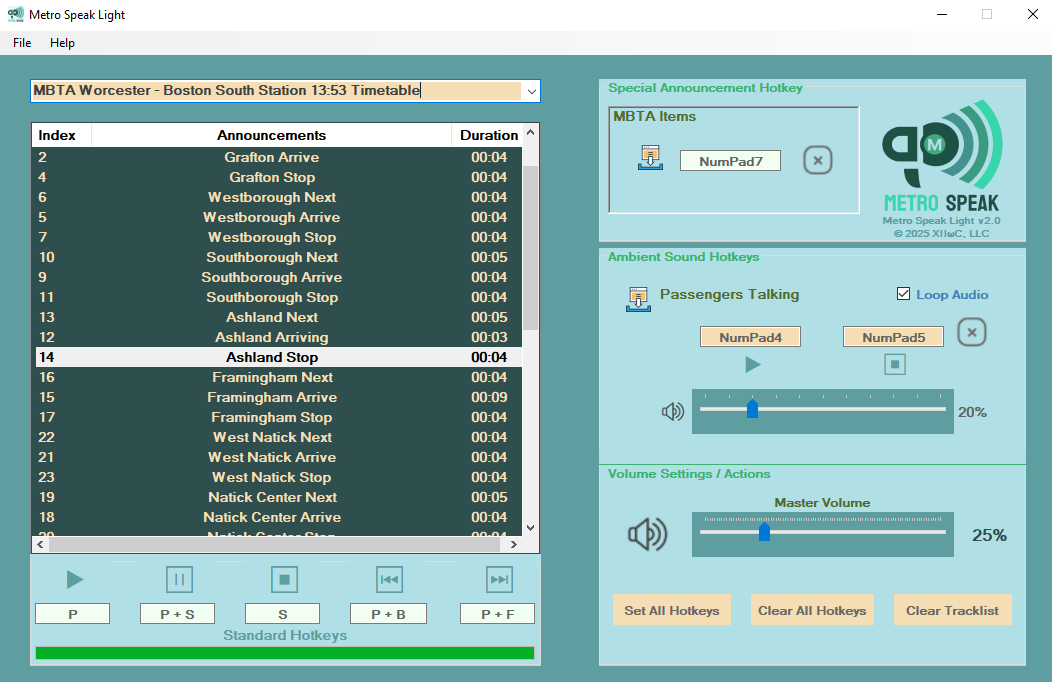
Metro Speak Light is an announcement player for train simulations such as: Train Sim World, Trainz, and SimRail. This edition allows up to 10 announcement sets, a special announcement hotkey slot for non-destination announcements, and an ambient sound player to fill in background sounds. For those wanting an announcement player that involves less use of hotkeys, check out Metro Speak Full Edition which includes quasi / semi automatic combined features.
To learn more about Metro Speak Light, view the Online Manual.
Requirements
OS: 64-bit Windows 10 or above, Windows Media Player
Tags: announcement-player metro-speak simrail train-sim-world train-simulator-classic trainz
Installation Instructions
The installer and Metro Speak Light app are both .exe files which will trigger a warning for Windows Defender or 3rd party antivirus software. To bypass this warning, click on the More Info link in the dialog box, then select the Run Anyways button to proceed.
You will be prompted to choose the installation directory. The recommended location is within your AppData folder to avoid potential issues with system-level directories. By default, the setup will suggest installing the program into C:Users<Username>AppDataLocalMetroSpeak/MetroSpeakLight.
If you choose to install into a different directory such as Program Files or Program Files (x86) the file path chosen may be denied by Windows. To remedy this, change your Windows User settings / privileges or install Metro Speak into a different directory.
Files
Comments
About this mod

- Created
- 21 Sept 2024
- Updated
- 29 Mar 2025
- Game
- Train Sim World
- Type of content
- Announcement
- Train Sim World Content
- Bakerloo Line, Birmingham Cross-City Line, Blackpool Branches: Preston - Blackpool & Ormskirk, Brighton Main Line: London Victoria - Brighton, Cardiff City Network: Radur & Coryton to Penarth & Bae Caerdydd, Cathcart Circle Line: Glasgow - Newton & Neilston, Centro Regional Railways BR Class 323, East Coast Mainline: Peterborough to Doncaster, East Coastway: Brighton - Eastbourne & Seaford, Edinburgh - Glasgow: Engineering Express Pack, Expert DB BR 101 & IC Steuerwagen, Fife Circle Line: Edinburgh - Markinch via Dunfermline & Kirkcaldy, Glossop Line: Manchester - Hadfield & Glossop, Harlem Line: Grand Central Terminal - North White Plains, Hauptstrecke Hamburg - Lübeck, Hauptstrecke München - Augsburg, Hauptstrecke Rhein-Ruhr: Duisburg - Bochum, HKA Bogie Hopper Wagon Pack, Island Line 2022: BR Class 484 EMU Add-On, Isle Of Wight: Ryde - Shanklin, Kinzigtalbahn: Frankfurt - Fulda, LIRR Commuter: New York - Long Beach, Hempstead & Hicksville, LIRR M3 EMU, London Overground Mildmay line: Stratford - Willesden Junction, London Overground Suffragette line: Gospel Oak - Barking Riverside, London Underground 1938 Stock EMU, Long Island Rail Road: New York - Hicksville, Main Spessart Bahn: Aschaffenburg - Gemünden, Maintalbahn: Aschaffenburg - Miltenberg, MBTA Commuter: Boston - Framingham/Worcester Line, Midland Main Line: Leicester - Derby & Nottingham, Mittenwaldbahn: Innsbruck - Garmisch-Partenkirchen, Nahverkehr Dresden - Riesa, Niddertalbahn, Northeast Corridor: Boston - Providence, Northeast Corridor: New York - Trenton, Northern Trans-Pennine: Manchester - Leeds, Rhein-Ruhr Osten: Wuppertal - Hagen, Ruhr-Sieg Nord: Hagen - Finnentrop, S-Bahn Zentralschweiz: Luzern - Sursee, Schnellfahrstrecke Kassel - Würzburg, Schnellfahrstrecke Köln-Aachen, ScotRail BR Class 158 EMU, ScotRail BR Class 380 EMU, ScotRail Express: Edinburgh - Glasgow, West Coast Main Line: London Euston - Milton Keynes
- Train Sim World Version
- Train Sim World 2 before Rush Hour update (UE4 4.23), Train Sim World 2: Steam version (UE4 4.26), Train Sim World 2: Epic Games Store version (UE4 4.26), Train Sim World 3, Train Sim World 4, Train Sim World 5


Loading comments…